
This free online speed booster calculator works out the effective aperture (f-number × booster ratio) and the full-frame equivalent focal length (focal length × ratio × crop factor) for any lens on a speed booster, also called a focal reducer. Enter your lens, booster ratio and camera crop factor below, and the focal reducer calculator updates as you type. Everything runs in your browser.
Speed booster and focal reducer calculator
Results update as you type. Nothing is sent to a server.
Speed boosters are made for sensors smaller than the lens image circle. On a full-frame or larger sensor the shrunken image circle will not cover the frame, so expect vignetting.
Speed booster calculator formulas: effective aperture and focal length
The ratio is the number printed on the booster, such as 0.71× or 0.64×. Every result above comes from four multiplications and one logarithm:
- Effective aperture = original f-number × ratio
- Effective focal length = original focal length × ratio
- Full-frame equivalent focal length = effective focal length × camera crop factor
- Full-frame equivalent aperture (for depth of field) = effective aperture × camera crop factor
- Light change in stops = −2 × log2(ratio)
Bokeh and background blur match the full-frame equivalent f-number rather than the raw exposure f-stop.
Worked example: 50mm f/1.8 on APS-C with a 0.71× speed booster
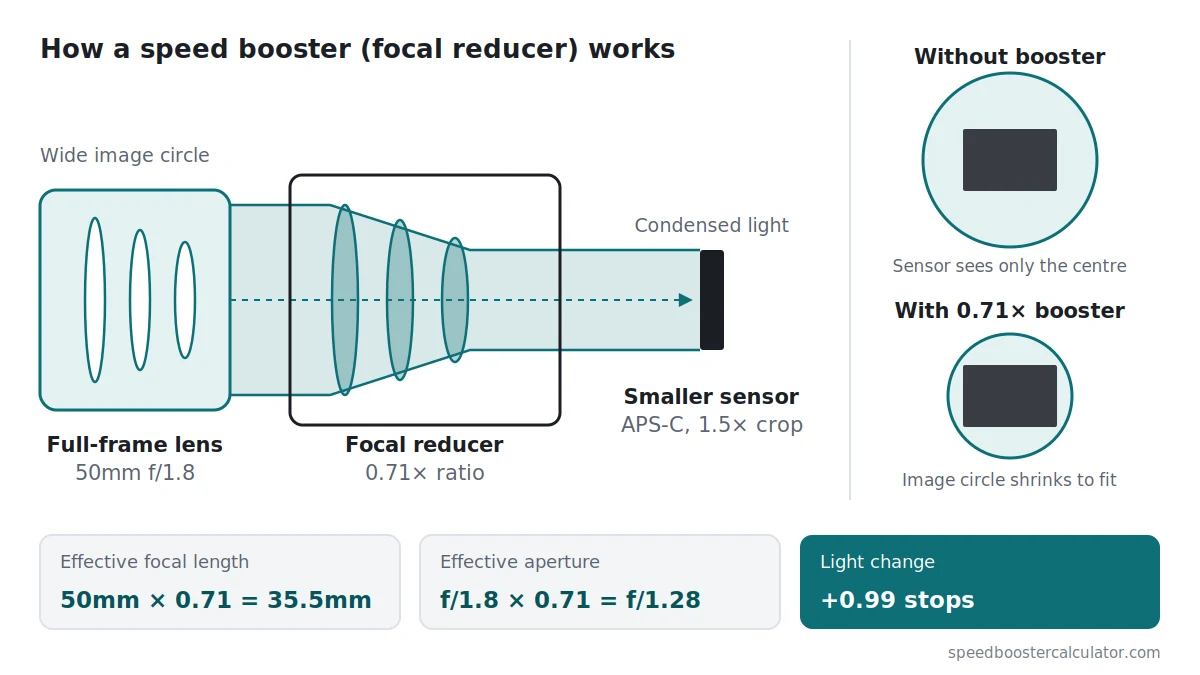
- Effective focal length: 50mm × 0.71 = 35.5mm
- Effective aperture: f/1.8 × 0.71 = f/1.28
- Full-frame equivalent focal length (1.5× crop): 35.5mm × 1.5 = 53.25mm
- Full-frame equivalent aperture: f/1.28 × 1.5 = f/1.92
- Light change: −2 × log2(0.71) = +0.99 stops
Without the booster, the same lens on the same camera is 75mm f/1.8, or f/2.7 in full-frame terms. The booster gives you a wider view and a faster lens.
Speed booster ratios and stops gained
Effective f-number for common ratios. These are theoretical values; glass absorption lowers the real gain slightly. For every aperture at once, see the speed booster ratio chart.
| Ratio | Light change | f/1.4 becomes | f/2 becomes | f/2.8 becomes | f/4 becomes |
|---|---|---|---|---|---|
| 0.71× | +0.99 stops | f/0.99 | f/1.42 | f/1.99 | f/2.84 |
| 0.64× | +1.29 stops | f/0.9 | f/1.28 | f/1.79 | f/2.56 |
| 0.58× | +1.57 stops | f/0.81 | f/1.16 | f/1.62 | f/2.32 |
| 1.4× teleconverter | −0.97 stops | f/1.96 | f/2.8 | f/3.92 | f/5.6 |
| 2.0× teleconverter | −2 stops | f/2.8 | f/4 | f/5.6 | f/8 |
Camera crop factors for the speed booster calculator
The last column is the combined crop factor (camera crop × 0.71). At about 1.07, a 0.71× booster on APS-C nearly restores a full-frame field of view.
| Sensor format | Crop factor | With a 0.71× booster |
|---|---|---|
| APS-C (Sony, Nikon, Fujifilm) | 1.5 | about 1.07 |
| APS-C (Canon) | 1.6 | about 1.14 |
| Micro Four Thirds | 2.0 | 1.42 |
| Full frame | 1.0 | Works only in specific setups, see full-frame coverage guide |
How a speed booster or focal reducer changes your lens
A speed booster is a focal reducer: an adapter with glass elements that condenses the lens’s full image circle onto a smaller sensor. The sensor sees a wider field of view and the light is concentrated, which lowers the f-number by the ratio. It only makes sense for lenses whose image circle is larger than your sensor. For the full explanation, read the guide to speed booster effective aperture.
New to the concept? Start with what is a speed booster for the plain-English version, or see does a speed booster make APS-C full frame if you’re weighing one against a full-frame body.
Speed booster calculator FAQ
What is effective aperture with a speed booster?
Effective aperture is the lens f-number multiplied by the speed booster ratio. A 50mm f/1.8 lens with a 0.71× booster behaves like f/1.28 for exposure (1.8 × 0.71 = 1.278).
How do I calculate the full-frame equivalent focal length?
Multiply the lens focal length by the booster ratio, then by the camera crop factor. Example: 50mm × 0.71 × 1.5 = 53.25mm full-frame equivalent.
Is this also a focal reducer calculator?
Yes. Speed booster and focal reducer describe the same kind of adapter, so the maths is identical. Pick the ratio printed on your adapter, such as 0.71× or 0.64×, or enter a custom value. The calculator then shows the new aperture, focal length and light change.
Can I use this calculator for teleconverters?
Yes. Choose 1.4× or 2.0×, or enter a custom ratio above 1. The same formulas apply, and the light change is negative because a teleconverter loses light.
Does the calculator account for light lost in the adapter glass?
Only if you enter it. By default it assumes ideal optics, so results are theoretical f-stops. If your adapter's spec lists a light loss, type it into the adapter light loss field to see an estimated T-stop. The guide covers the T-stop vs f-stop difference in detail.
How do I find the speed booster ratio I need?
Switch the calculator to "Find the ratio I need" and enter your lens, crop factor and the full-frame equivalent focal length you want. The ratio is that target divided by lens focal length times crop factor. A 50mm lens on a 2.0× camera needs 0.70× for 70mm, so a 0.71× booster gives 71mm.
Can I share my calculator result?
Yes. Copy link gives you a link that reopens the calculator with your lens, ratio and camera values filled in. Copy result gives you a one-line summary you can paste into a forum post or message.
What crop factor should I enter if my camera is not in the list?
Divide 43.27 by your sensor diagonal in millimetres. Common values are 1.5 for Sony, Nikon and Fujifilm APS-C, 1.6 for Canon APS-C and 2.0 for Micro Four Thirds.
Learn the speed booster maths
- Speed booster effective aperture guide: the formula, worked examples and full-frame equivalents.
- Do speed boosters really add light?: what changes, and what doesn’t.
- T-stop vs F-stop on a speed booster: why the geometric aperture drop is real, but transmitted light runs slightly slower.
- Speed booster ratio chart: new f-number at every aperture.
- Speed booster crop factor table: combined crop factor for APS-C and Micro Four Thirds.
- APS-C to full frame calculator: focal length, aperture and ISO equivalents.
Method and limits
As an effective aperture calculator for speed boosters, this tool uses the standard optical relationships listed above and assumes ideal optics. It does not model glass absorption; see T-stop vs F-stop on a speed booster for that, along with why your camera’s screen may still show the original aperture. Crop factors are for common sensor formats; enter your own value if your camera crops in a video mode, and see the video crop mode section for typical values.
Last updated: